AI calorie counter for iPhone and iPad

Your day, one ring

Snap a meal and Calorify estimates calories, protein, carbs and fat for every item on the plate. Each meal fills your daily ring, so you always see what's left.

Download on the App Store

Free to download. Premium adds unlimited photo scans, voice logging and AI insights.

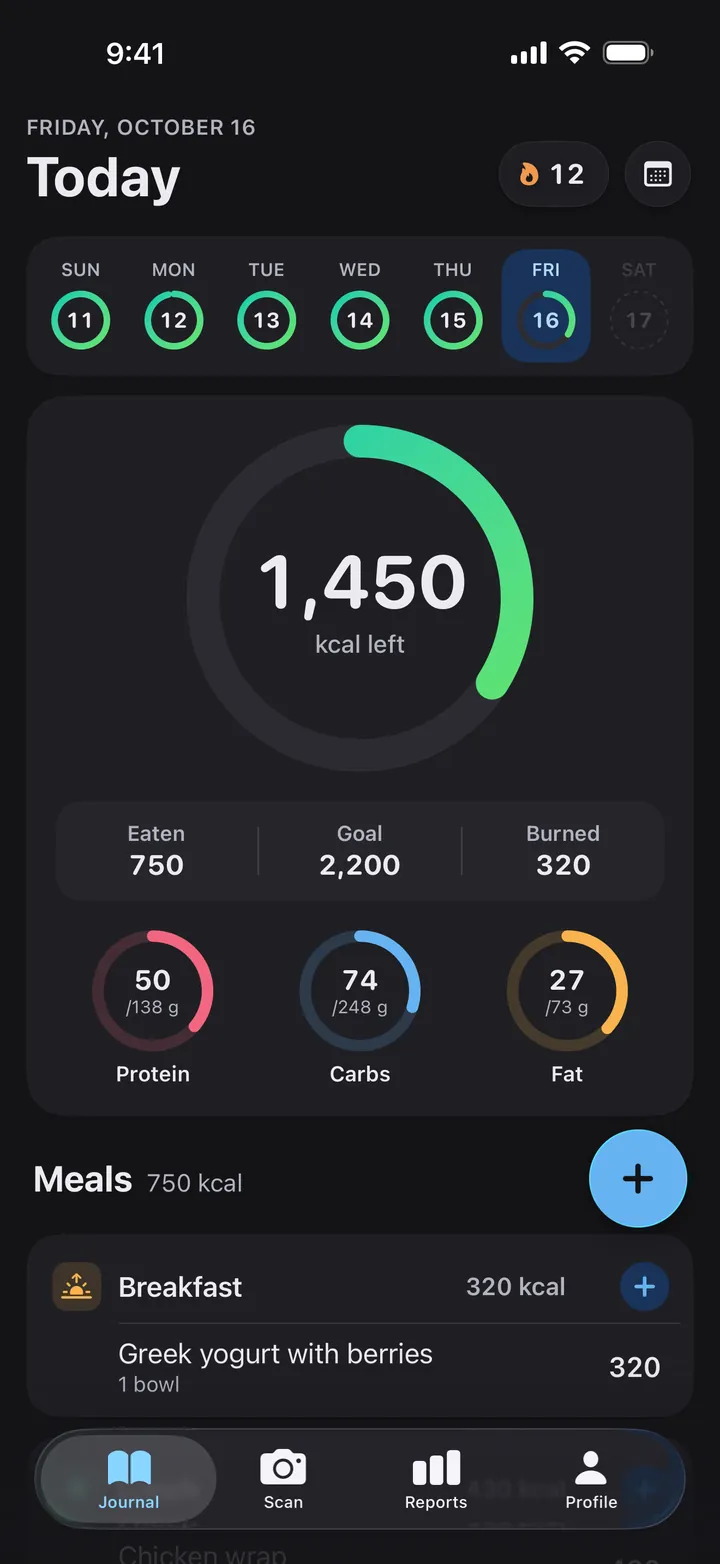
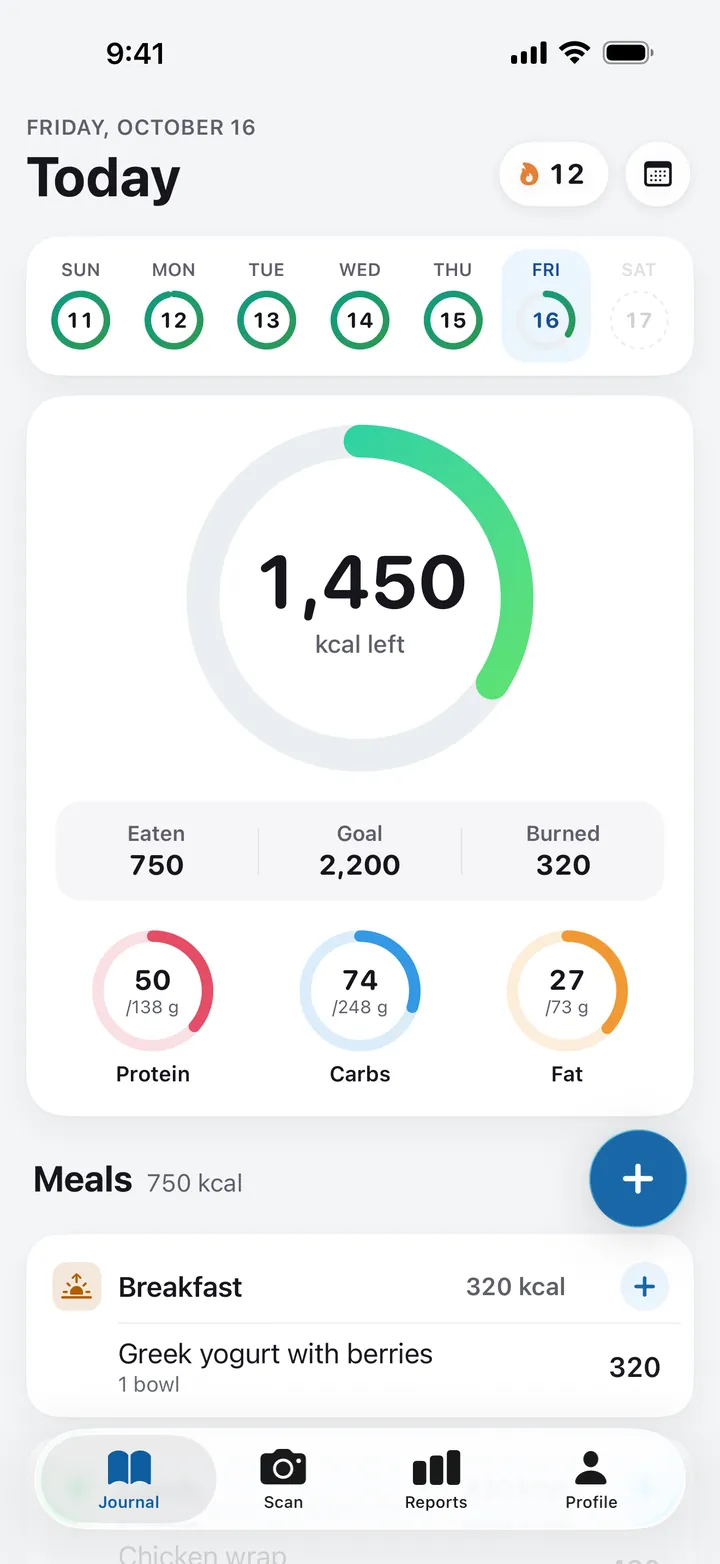
Calorify's Journal on iPhone: a 12-day streak, and a ring showing 1,450 kcal left of a 2,200 kcal goal, with 750 eaten, 320 burned, and protein, carbs and fat rings below it.

Scan

Four ways to log a meal

Pick the way that fits the moment. Every entry lands on the meal and day you choose.

AI photo scan

Point. Snap. Know.

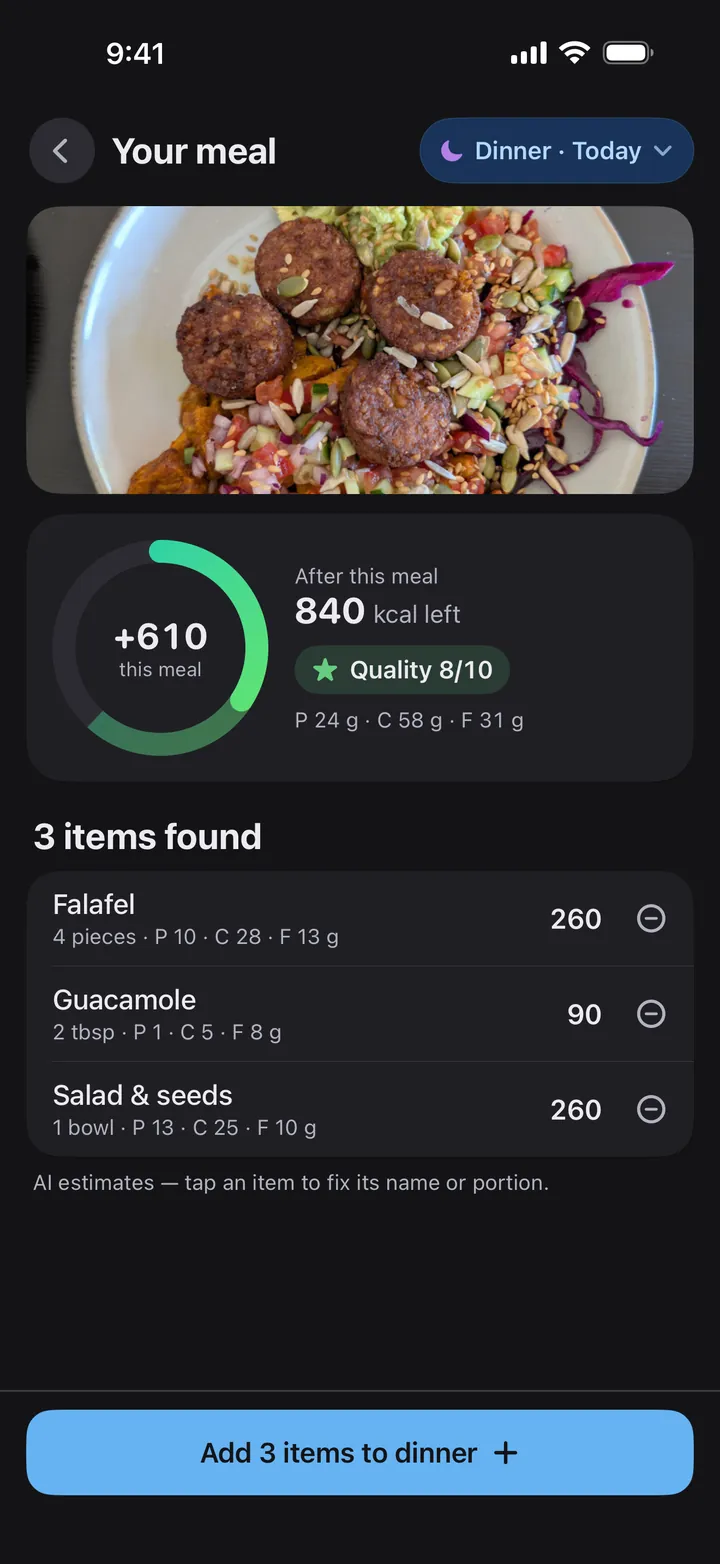
Take a photo or choose one from your library. Calorify finds each item on the plate and estimates its portion, calories, protein, carbs and fat.

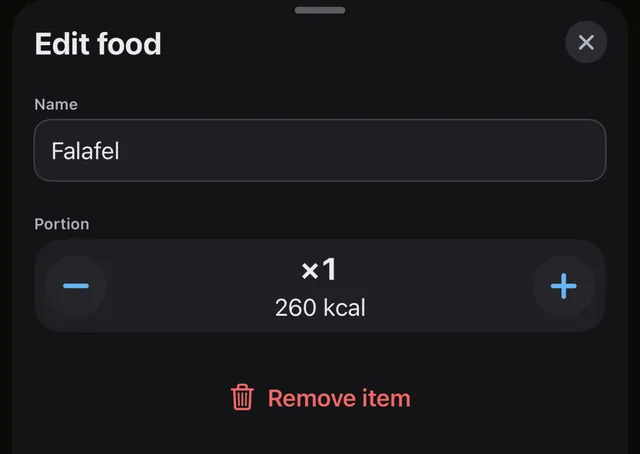
  • Tap any item to fix its name or portion, or remove it.
  • Before you add the meal, the ring shows what's left after it.
  • Add it to breakfast, lunch, dinner or a snack, today or on an earlier day.

AI estimates. You have the final say. Free plan: 3-day trial of photo scans. Premium: unlimited.

A scan result for a photo of a falafel plate: falafel, 4 pieces, 260 kcal; guacamole, 2 tbsp, 90 kcal; salad and seeds, 1 bowl, 260 kcal. The ring shows +610 kcal for this meal and 840 kcal left after it.
The Edit food sheet for the falafel: its name, a portion of ×1 at 260 kcal with minus and plus buttons, and Remove item.

Voice logging Premium

Or just say it.

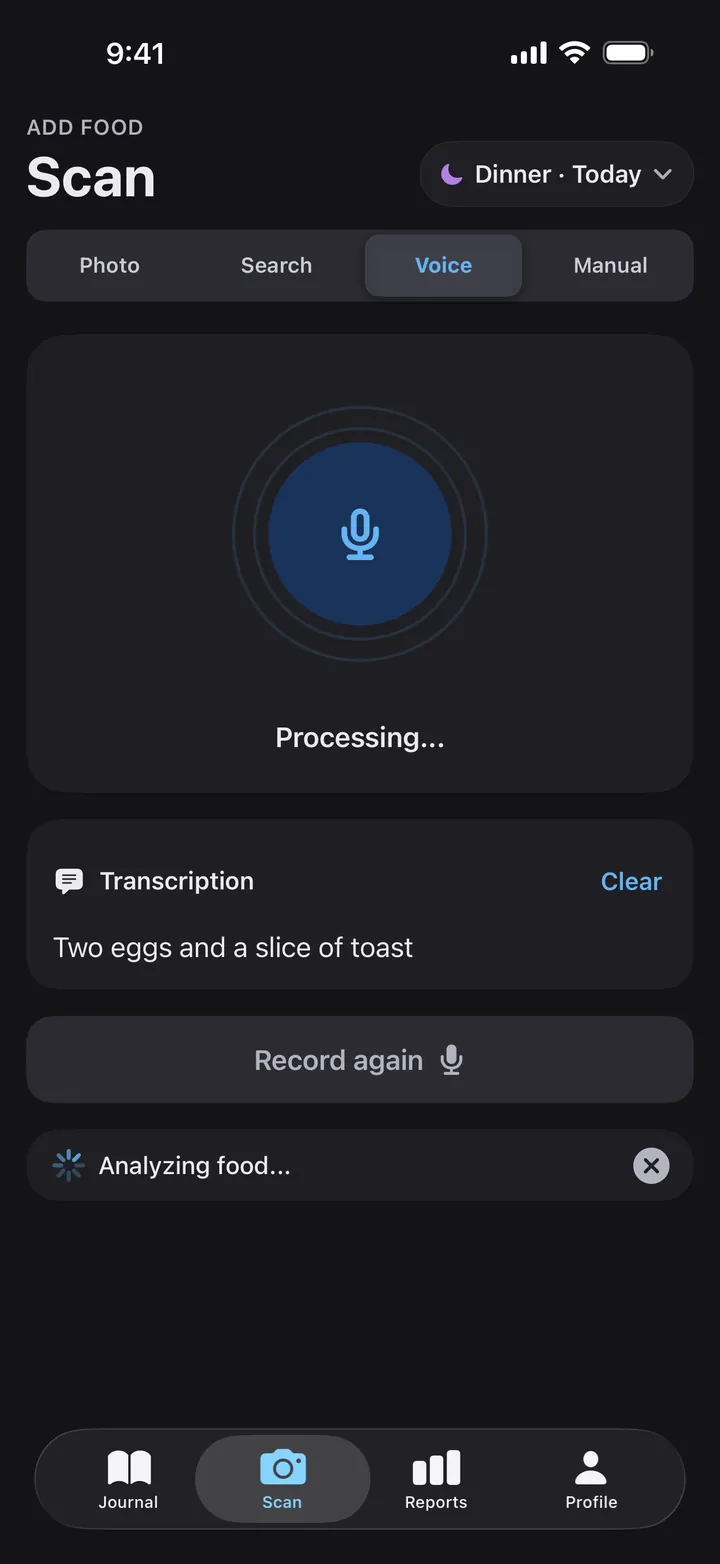
Tap the microphone and say what you ate, the way you'd tell a friend. Check the transcript, edit it if you need to, and Calorify turns it into foods with calories and macros you can review before adding.

  • “I ate an apple for breakfast”
  • “Log 2 slices of pizza for lunch”
  • “Add a cup of coffee”
Voice mode after a recording: the transcription reads 'Two eggs and a slice of toast' while Calorify analyzes the food.
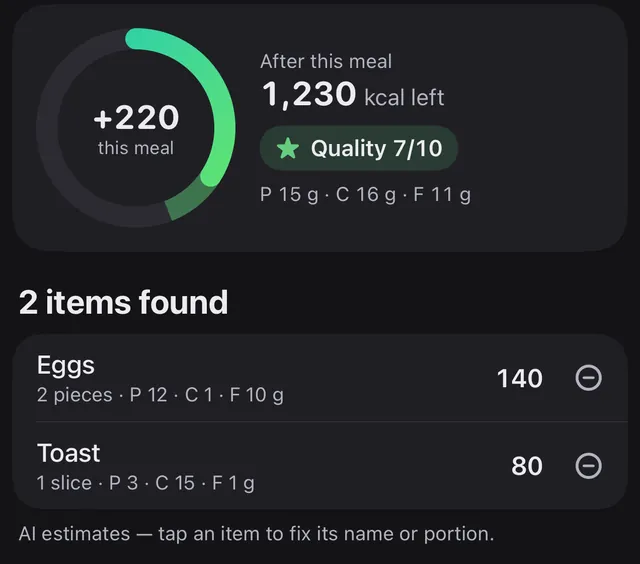
The foods found from the recording: eggs, 2 pieces, 140 kcal, and toast, 1 slice, 80 kcal. The meal adds 220 kcal and leaves 1,230 kcal for the day.

Journal

Every meal fills the ring

Your calorie goal and macro targets are calculated from your profile, activity level and goal. Adjust them any time in Profile.

The daily ring

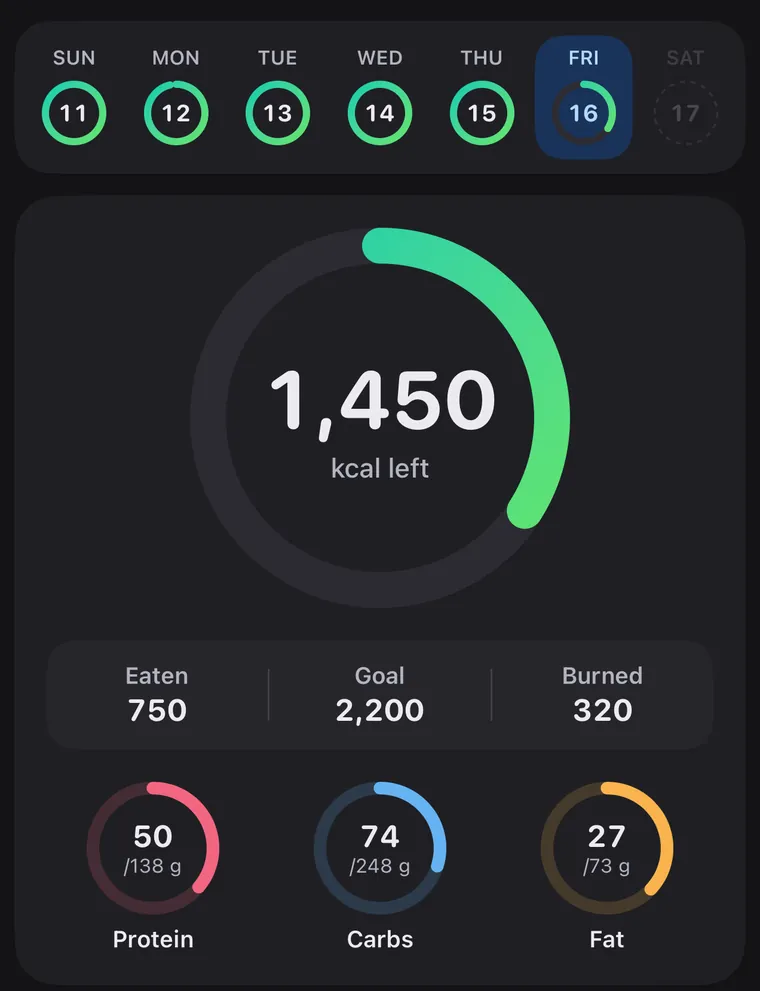
The Journal's week strip, a small ring for each day from Sunday the 11th to today, Friday the 16th, above the daily ring: 1,450 kcal left; eaten 750, goal 2,200, burned 320; protein 50 of 138 g, carbs 74 of 248 g, fat 27 of 73 g.
  • Your week Every day gets a ring of its own, so a missed day is easy to spot.
  • Calories left What's left of today's goal. Go over and the ring tells you by how much.
  • Eaten, goal, burned Burned comes from Apple Health, once you connect it.
  • Protein, carbs, fat Grams so far against your own targets.

Water tracking

A glass, a tap.

Add 250 or 500 ml with one tap, or fluid ounces if you use US units. Your daily goal follows your body weight, and a water streak counts the days you reach it.

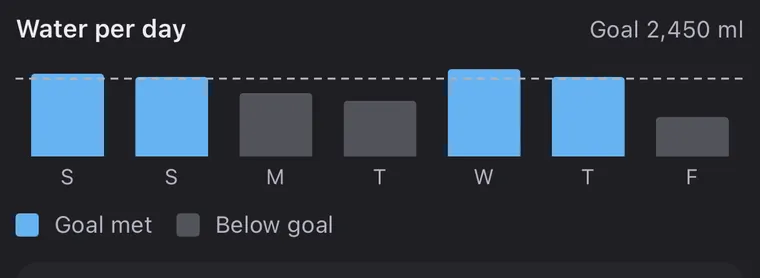
Water per day for a week against a 2,450 ml goal: the goal was met on 4 of 7 days.

Streaks and achievements

Keep the streak.

Log on consecutive days to grow your streak. 22 achievements mark streaks from 3 days to a full year, days on your calorie, protein and water goals, and logging milestones.

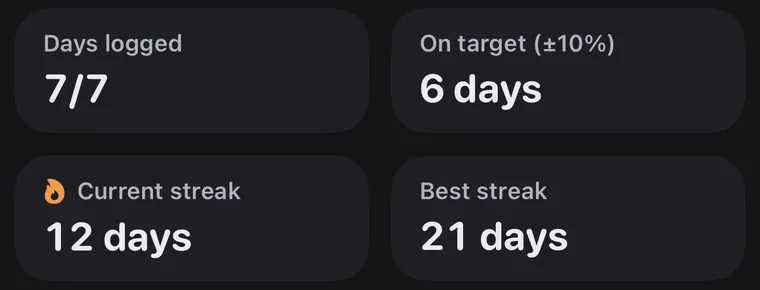
Report tiles: 7 of 7 days logged, 6 days on target, a 12-day current streak and a 21-day best streak.

Reports

Watch your week fill up

Switch between a week, a month, 3 months and a year to see how your days add up.

Reports for any range

Every day a ring.

Overview
Average calories per logged day, days on target (within 10%), your current and best streak, and calories against your goal.
Nutrition
Where your calories come from, daily averages against your targets, your meals, your most-logged foods, and fiber, sugar and sodium.
Progress
Every day as a ring, water per day, and steps and active energy from Apple Health.

Overview, Nutrition, Progress and water stay free.

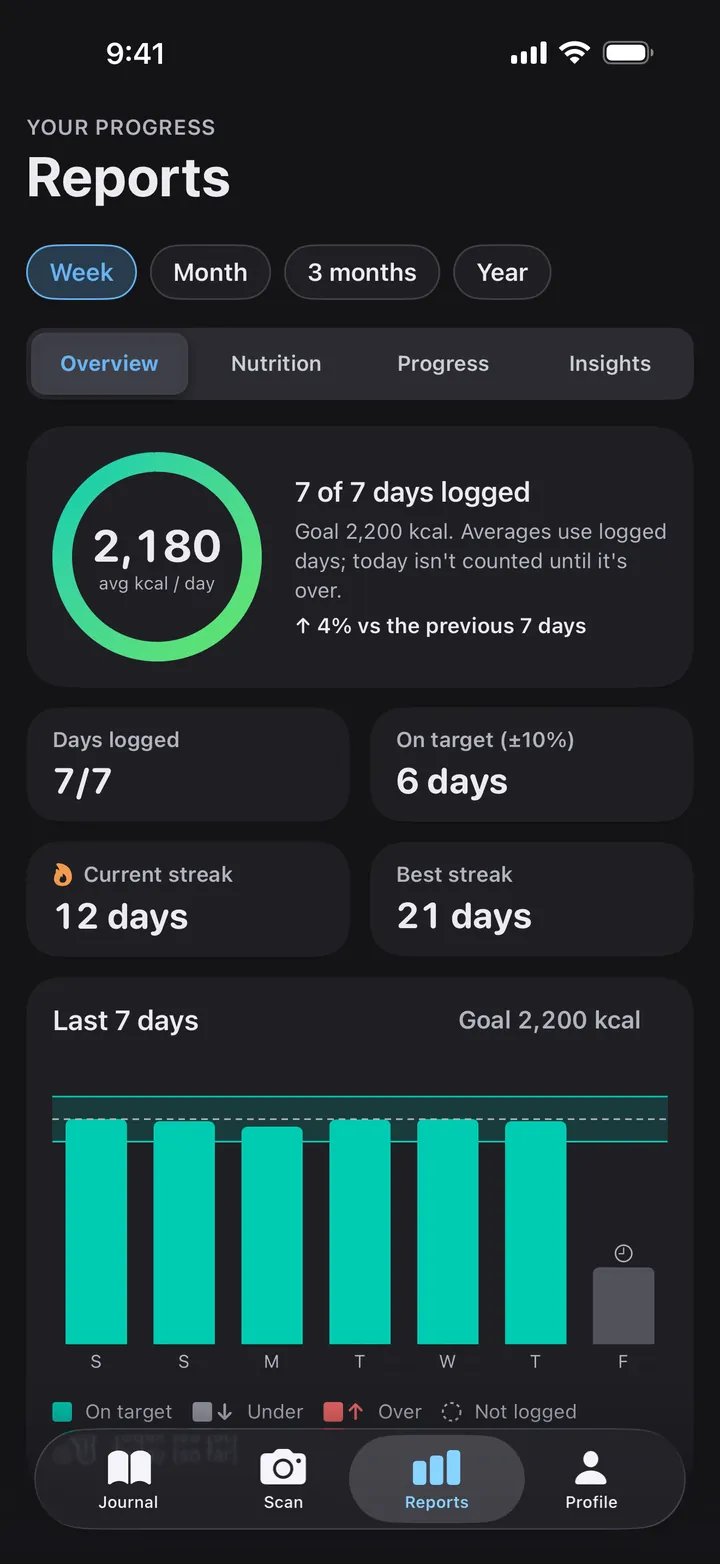
Reports for a week, Overview tab: 2,180 kcal on average per logged day, 7 of 7 days logged, up 4% on the previous 7 days, 6 days on target, a 12-day streak with a best of 21 days, and a bar for each of the last 7 days.

AI insights Premium

Small steps from what you really ate.

For the range you pick, Calorify reads your logged days and shows the one or two changes that matter most, each with the numbers behind it and one thing to try.

  • When a tip is about timing, turn on a water or meal reminder with one tap.
  • See what went well compared with the period before.

Generated from your logged days only. Not medical advice.

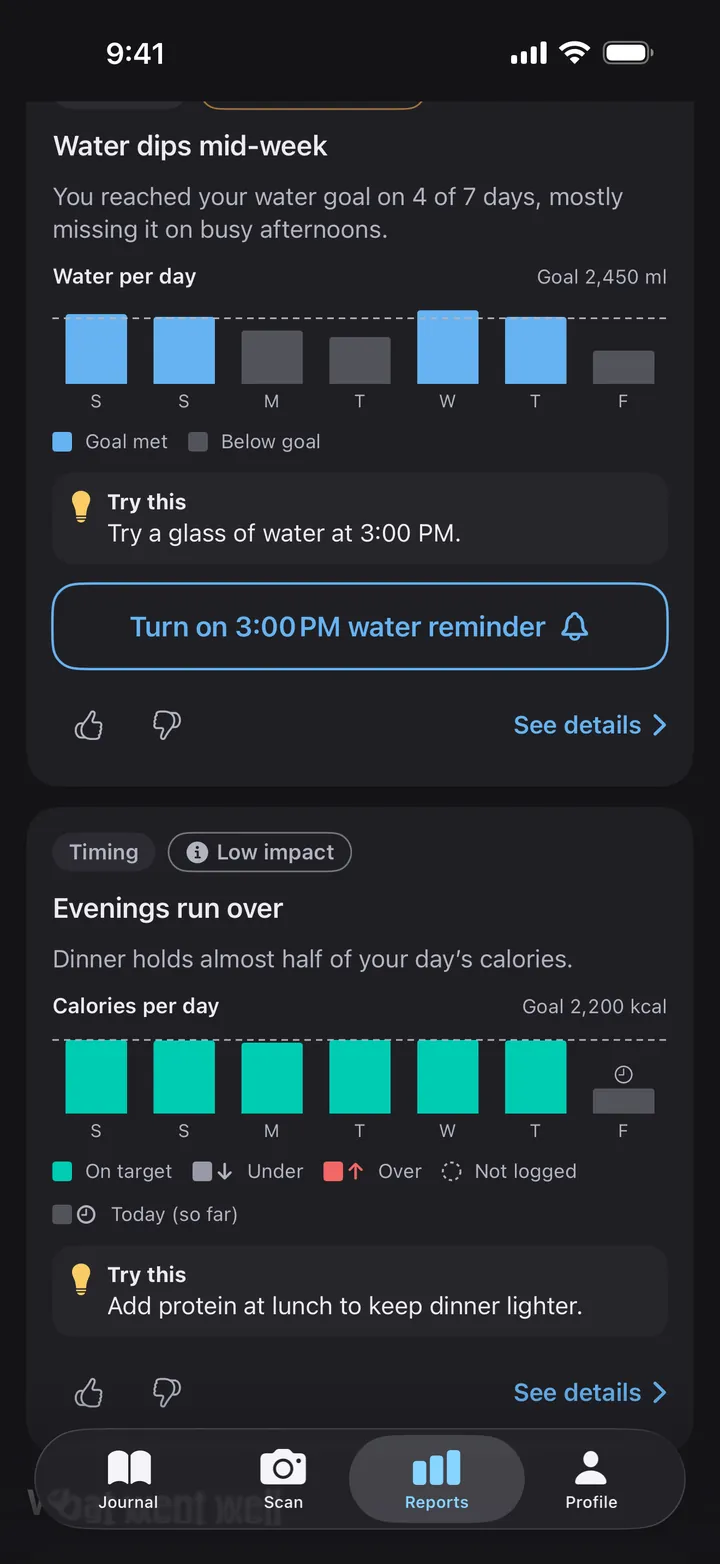
Insights for a week: 'Water dips mid-week', the water goal reached on 4 of 7 days, with water per day against a 2,450 ml goal, a tip and a reminder button, then a timing insight, 'Evenings run over'.
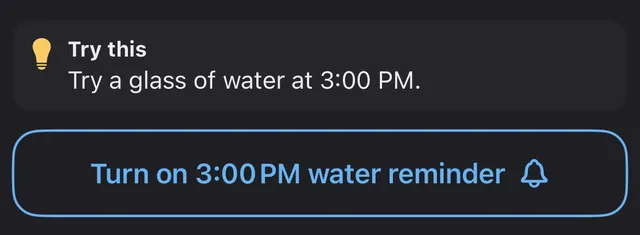
The tip 'Try a glass of water at 3:00 PM' and the button 'Turn on 3:00 PM water reminder'.

Widgets and devices

Your ring, at a glance

Keep today's ring in view without opening the app. Tap a widget to open your journal.

Home Screen and Lock Screen widgets

Five sizes, one ring.

Small
Home Screen: today's ring and the calories left.
Medium
Home Screen: the ring, protein, carbs, fat and water, and a button to scan a meal.
Circular
Lock Screen: the calories left as a ring.
Rectangular
Lock Screen: calories left, plus protein against your target.
Inline
Lock Screen: one line beside the date with the calories left.
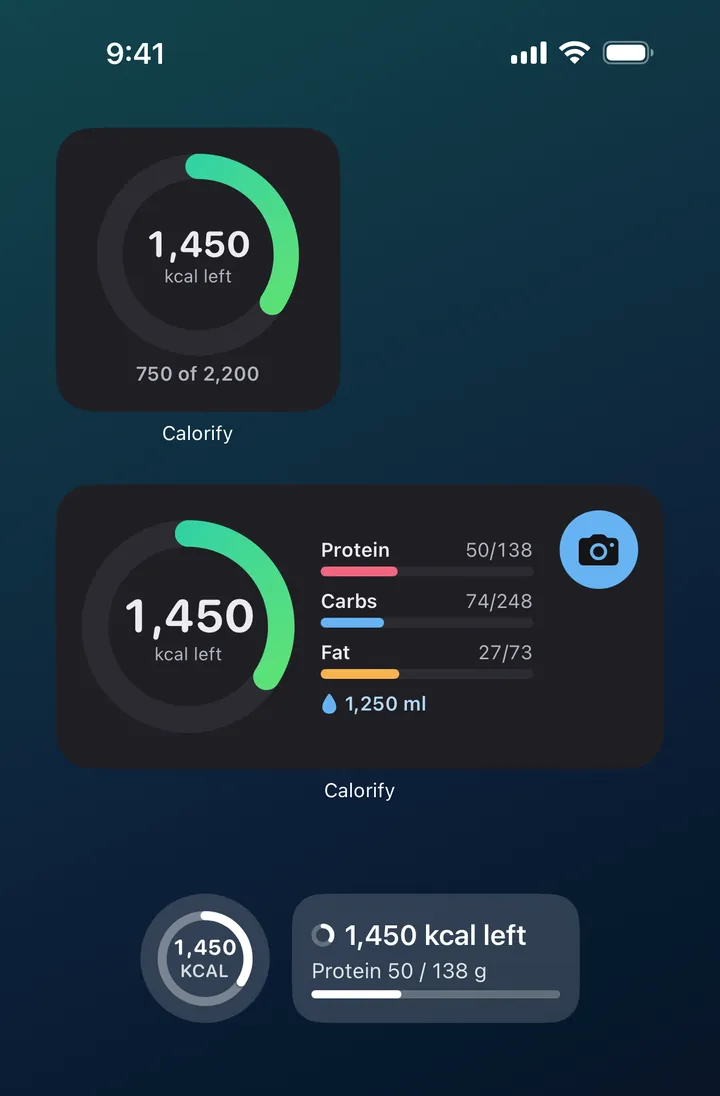
Calorify's widgets: a small Home Screen widget with 1,450 kcal left of 2,200; a medium one with the ring, protein 50 of 138 g, carbs 74 of 248 g, fat 27 of 73 g, 1,250 ml of water and a scan button; and circular and rectangular Lock Screen widgets with 1,450 kcal left and protein 50 of 138 g.

iPhone and iPad, light and dark

Made to fit in.

Devices
iPhone and iPad with iOS or iPadOS 17.6 or later
Appearance
Light, dark, or match your system
Units
Metric or US: ml or fl oz, cm or feet and inches
Apple Health
Optional: fill in your profile and see steps and active energy
Languages
15, chosen in Profile:
  • English
  • Türkçe
  • Deutsch
  • Español
  • Français
  • Italiano
  • Português
  • Nederlands
  • Polski
  • Русский
  • 日本語
  • 한국어
  • 简体中文
  • العربية
  • हिन्दी
The Journal in light appearance: 1,450 kcal left of 2,200, with protein, carbs and fat rings.
The same Journal screen in dark appearance.

Free and Premium

What you get

The core of Calorify is free. Calorify Premium unlocks the AI features without limits.

Features on the free plan and with Calorify Premium
FeatureFreePremium
Journal, search and manual entry
Reports and water
Photo scans3-day trialUnlimited
Voice logging
AI insights

Calorify Premium is an auto-renewing monthly or yearly subscription. The app shows the price in your currency before you subscribe, and you can cancel anytime in your Apple Account settings.

The 3-day photo scan trial starts when you finish setup on a new account, includes a daily number of scans, and is available once per person and device.

Questions

Frequently asked

How does Calorify count calories?

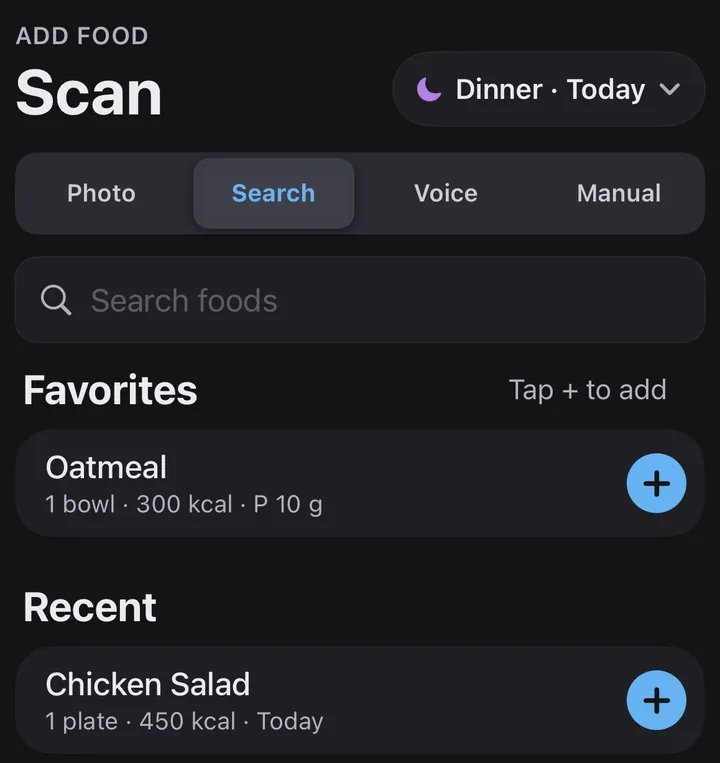
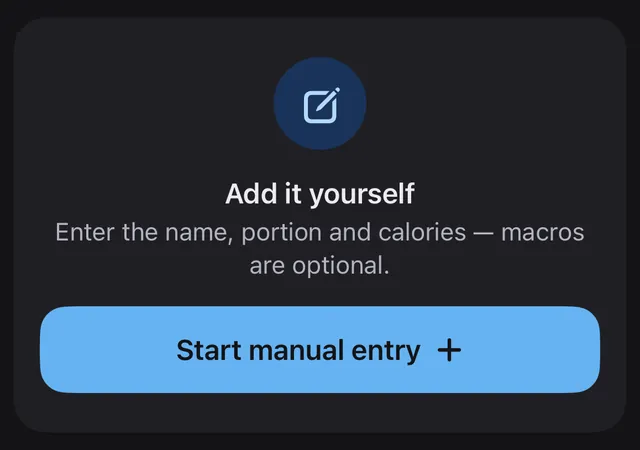
Take a photo and Calorify's AI estimates the portion, calories, protein, carbs and fat of each item on the plate. You can also say what you ate, search for a food or enter it yourself. You can check and edit every item before it's added to your day.

Is Calorify free?

Calorify is free to download. The journal, food search, manual entry, reports and water tracking are free, and the free plan includes a 3-day trial of photo scans. Unlimited photo scans, voice logging and AI insights come with Calorify Premium, an auto-renewing monthly or yearly subscription. The app shows the price in your currency before you subscribe.

How accurate are the photo estimates?

They're AI estimates, so treat them as a starting point. Tap any item to fix its name or portion, or remove it, before you add the meal. Calorify is not a medical device and doesn't give medical advice.

Does Calorify work with Apple Health?

Yes, if you want it to. With your permission, Calorify reads your height, weight, date of birth and sex from Apple Health to fill in your profile, and your steps and active energy to show your activity in the journal and reports. Connecting Apple Health is optional.

Which devices and languages does Calorify support?

Calorify runs on iPhone and iPad with iOS or iPadOS 17.6 or later, in light or dark appearance, and in 15 languages: English, Turkish, German, Spanish, French, Italian, Portuguese, Dutch, Polish, Russian, Japanese, Korean, Simplified Chinese, Arabic and Hindi.

What happens to my food photos and voice recordings?

When you scan a photo or record a voice entry, it's sent to our servers and to OpenAI to estimate the foods and their nutrition values. We don't store voice recordings. We never sell your personal information or share your food logs with advertisers. The Privacy Policy has the details.


Something else? See Support for subscriptions, restoring purchases and deleting your account, or email lkmcelik@hotmail.com.

Start with your next meal

Calorify is free to download for iPhone and iPad.

Download on the App Store